

We recently competed in the Maltego community OSINT CTF - Qualifier A - 2026 and managed to secure 15th place out of 160 teams! I have put together some writeups covering some of the interesting challenges we solved during the event.
I mostly solved maritime, aviation, geolocation, and Threat Intelligence challenges, and my other partner solved other categories.
1. Lost at Sea - 1
Challenge Overview
- Category: Maritime OSINT
- Points: 100
- Target: Identify the floating metallic object highlighted inside a red square in a satellite image.

The Approach & Solution
Instead of overcomplicating things with satellite telemetry or complex ocean mapping tools, I started with the simplest step possible: Google Reverse Image Search.
- Reverse Image Search: Uploaded the image to Google Lens.
- Source Match: Found an exact matching satellite photo in a news report on Mezha.net covering a SpaceX soft splashdown recovery in the Indian Ocean.
- Identification: The article confirmed the floating hull was SpaceX’s Starship 40 (S40) following Flight 13.
Flag: flag{Starship_40}
2. Lost at Sea - 2
Challenge Overview
- Category: Maritime OSINT
- Points: 100
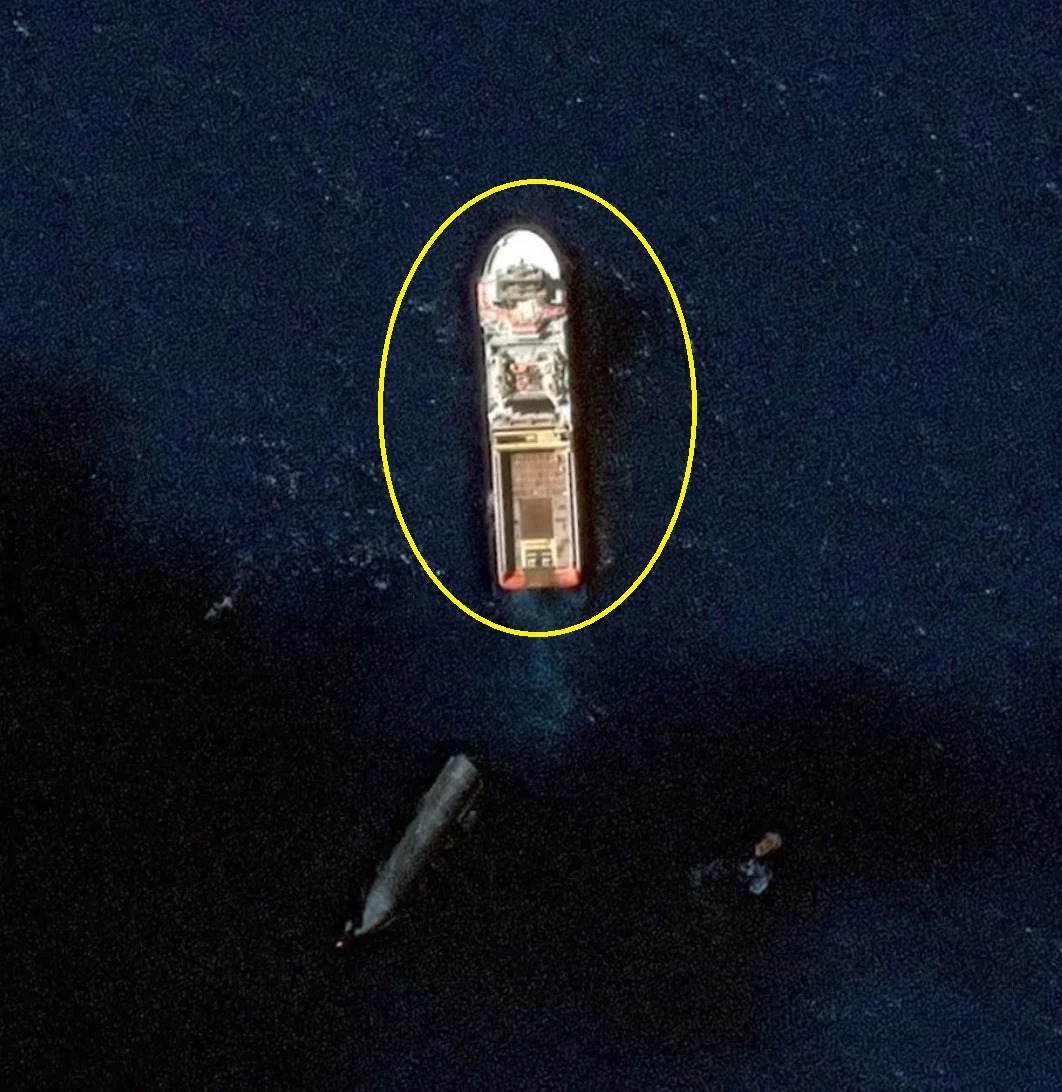
- Target: Identify the vessel pulling the rocket inside the yellow circle and extract its official IMO registry number.
The Approach & Solution
Since this was a direct continuation of the first challenge, I didn’t even need to search for a new source.
- Source Re-examination: The ship details were right in the same Mezha.net article I used for Part 1 — the name was mentioned directly in the article text and the image caption.
- Vessel Identification: Extracted the ship’s name as the Norwegian anchor-handling tugboat Normand Ranger.
- IMO Lookup: Did a quick Google search for the ship’s IMO number to pull its official registry ID (9413432).
Flag: flag{Normand_Ranger_9413432}
3. Identify the Aircraft
Challenge Overview
- Category: Aviation OSINT
- Points: 182 (200 Pts)
- Target: Analyze an intercepted aviation signal and identify the complete aircraft model from the embedded registration.
The Approach & Solution
So this was an aviation challenge where I had to identify an aircraft from a signal string. The string looked like random junk at first: /QUKAXBA.ADS.G-VIIW0301072498E7FD3D0021B4DA9F7EC2
- Initial Search: I just threw the whole string into Google, but got nothing useful. Classic dead end.
- Signal Analysis: After staring at it for a bit, I noticed the
G-prefix in the middle —G-VIIW. I had some basic aviation OSINT knowledge from previous challenges, so I knewG-is a UK aircraft registration prefix. - Registration Lookup: I searched
G-VIIWdirectly on Google. Found a few plane names pop up, so I just tried them one by one. - Trial and Error: Some attempts failed, but eventually I landed on the right one: Boeing 777-236(ER).
Flag Formatting
The challenge wanted the model name with special characters removed and spaces replaced by underscores:
Flag: flag{Boeing_777_236_ER}
4. Where Did It Land?
Challenge Overview
- Category: Aviation OSINT
- Points: 300
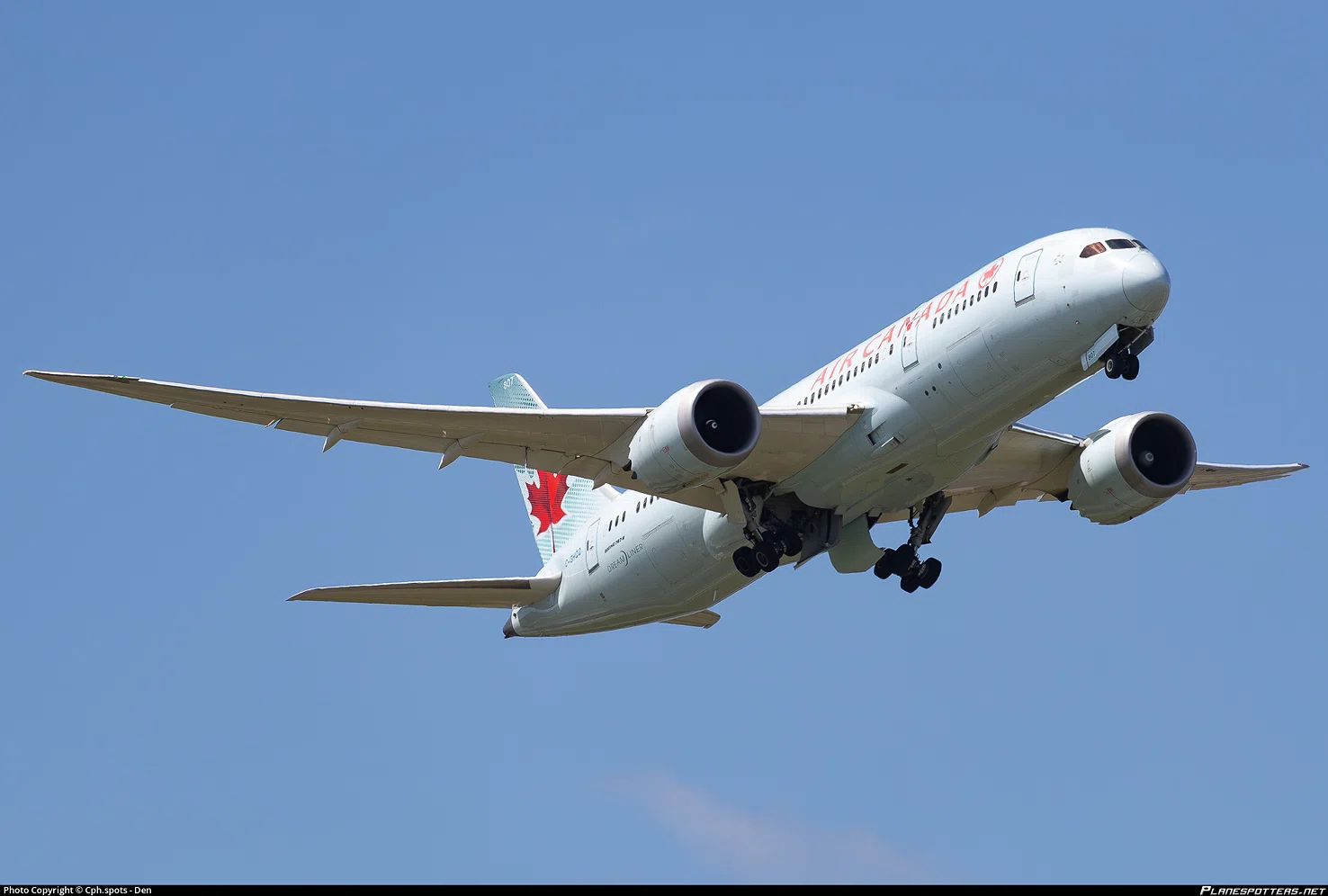
- Target: Identify the airport where a specific aircraft was located on 11 February 2025 at around 11:00 UTC.
The Approach & Solution
So this challenge gave me an image of an aircraft and asked me to figure out where it landed on a specific date. Here’s how I did it:
- Reverse Image Search: First I just did a Google reverse image lookup on the aircraft photo. That led me to a Planespotters.net page with all the aircraft details.
- Registration Extraction: From Planespotters, I got the aircraft’s registration number.
- ADS-B Exchange Search: I went to ADS-B Exchange and searched with that registration number to pull up the plane’s full flight history.
- Date Filtering: The challenge specified 11 February 2025 around 11:00 UTC, so I filtered the flight history for that date.
- Route Discovery: Found the landing and takeoff route for that day.
- Coordinate Lookup: Copied the landing coordinates and looked them up on Google. The coordinates 43.691°, -79.640° correspond to Toronto Pearson International Airport (also known as Lester B. Pearson International Airport).
Airport Codes
- IATA Code: YYZ
- ICAO Code: CYYZ
Flag
Flag: flag{YYZ}
5. The Unknown Hex ID
Challenge Overview
- Category: Aviation OSINT
- Points: 180
- Target: Identify the aircraft and its owner/operator from an intercepted HEX ID.
The Approach & Solution
So this challenge gave me a HEX ID and asked me to figure out who owns the aircraft. Here’s how it went down:
- Initial Google Search: First thing I did was just Google the whole hex string
8DA0551499091184C00400519503— got nothing useful. Classic. - Signal Analysis: The description mentioned it contained an important identifier, so I looked at it more carefully. Found
A05514embedded in there — that’s the Mode S transponder code (24-bit ICAO address) for an aircraft. - ADS-B Exchange Lookup: With that hex code, it was easy. I just went to ADS-B Exchange and searched
A05514. Got the full aircraft details instantly, including the registration and owner info. - Owner Identification: The database showed the aircraft was registered as N120QD, a Pilatus PC-12, operated by Quest Diagnostics Clinical Laboratories Inc.
Super easy challenge once I spotted the hex code hiding in the string.
Flag Formatting
The challenge wanted the complete owner/operator name in uppercase with underscores:
Flag: flag{QUEST_DIAGNOSTICS_CLINICAL_LABORATORIES_INC}
6. Who Took the Shot?
Challenge Overview
- Category: Image OSINT / Google Maps
- Points: 185
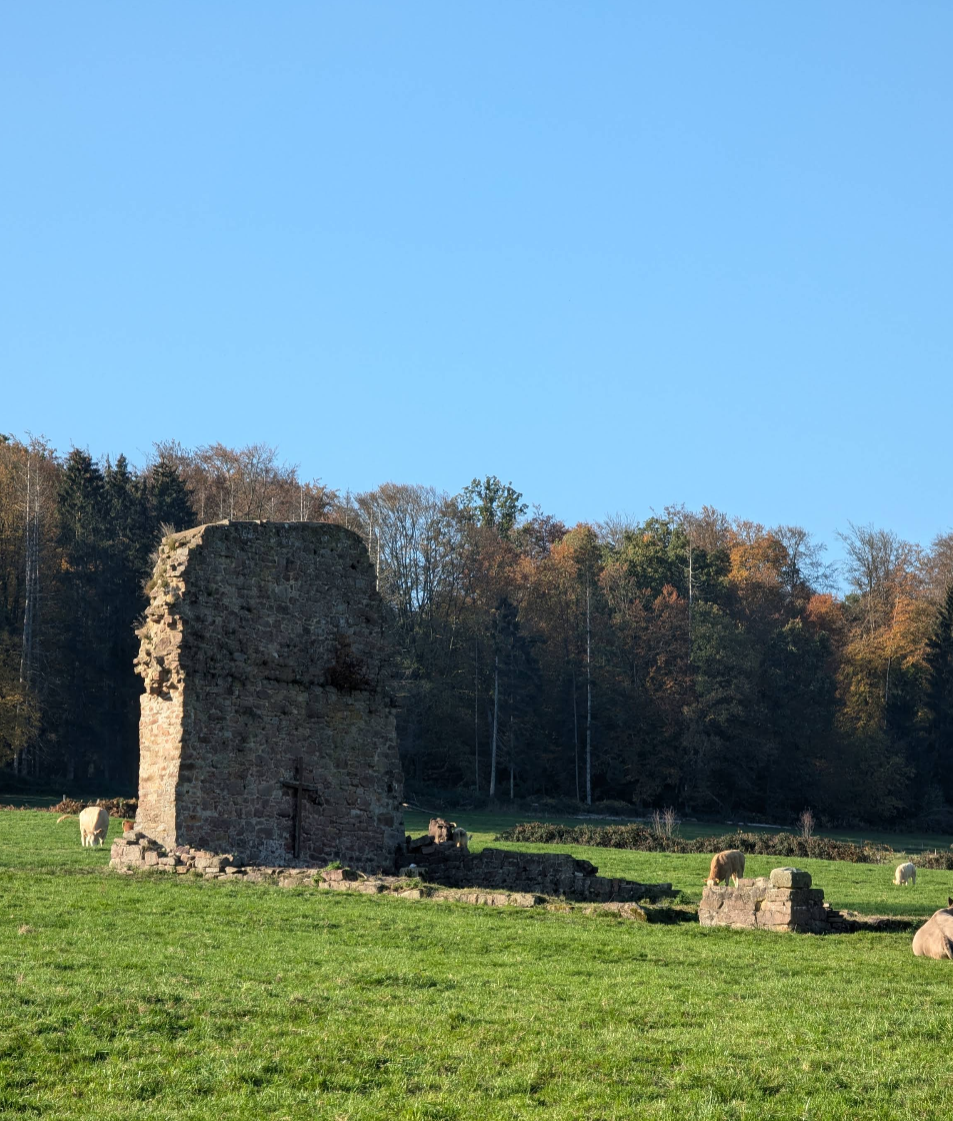
- Target: Identify the Google Maps contributor who uploaded a specific photograph.
The Approach & Solution
So this challenge gave me a photo of some old church ruins in a field and asked me to find who uploaded it to Google Maps. Here’s how I solved it:
- Reverse Image Search: First thing I did was a Google Lens reverse image lookup on the photo. That found the location — the Malliehagen church ruins in Germany — but didn’t give me the original uploader.
- Initial Search: Searched around a bit for the original image source but didn’t find it in any obvious list or article.
- Google Maps Check: After some time, I went to Google Maps directly, searched for the location, and checked the user-uploaded photos for that spot.
- Contributor Found: Scrolled through the uploaded images and found the exact photo. The uploader’s name was right there: Martina Simon.
Easy pz once I checked Google Maps directly instead of relying on search engines.
Flag Formatting
The challenge wanted the contributor’s name as first_last:
Flag: flag{Martina_Simon}
7. Before the Registration - 1
Challenge Overview
- Category: Web OSINT / Due Diligence
- Points: 100
- Target: Find the original price listed on the first Daniel Wellington website.
The Approach & Solution
So this challenge was about finding what Daniel Wellington’s website looked like back when they first started selling watches. Here’s how I did it:
- Domain Discovery: First I found the original website domain for Daniel Wellington.
- Internet Archive Search: Went straight to the Wayback Machine (web.archive.org) and searched for snapshots of the site.
- Earliest Snapshots: Found snapshots from October, November, and December 2011 — these were their first ever website versions.
- Collection Tab: Clicked into the “Collection” tab on the archived site, and the price was right there: $145.
That’s it. Easy pz.
Flag
Flag: flag{145}
8. Before the Registration - 2
Challenge Overview
- Category: Web OSINT / Due Diligence
- Points: 200
- Target: Find the number of days between Daniel Wellington’s website creation and its official company registration date.
The Approach & Solution
So this was a follow-up to the previous Daniel Wellington challenge. The task was to find the gap between when their website went live and when the company was officially registered in Sweden. Here’s how I did it:
- Website Creation Date: From the previous challenge, I already knew the website existed in 2011. I checked the Wayback Machine again to find the earliest snapshot — the domain was created on 16 February 2011.
- Official Registration Date: Went to the Swedish Companies Registration Office (Bolagsverket) and looked up Daniel Wellington AB. The official registration date was 8 December 2011.
- Date Calculation: Calculated the days between the two dates, excluding the end date:
- From 16 Feb 2011 to 8 Dec 2011 = 295 days.
The interesting part was that the website was live and selling watches months before the company was legally registered — that’s the discrepancy the challenge was pointing at.
Flag
Flag: flag{295}
9. Behind the University VPN
Challenge Overview
- Category: Network OSINT / Threat Intelligence
- Points: 300
- Target: Identify the Autonomous System Number (ASN) associated with the University of London’s VPN infrastructure.
The Approach & Solution
Ngl this was the most basic question in the whole set. I didn’t use any lookup website, didn’t read any official docs or articles about it. Just did one single Google search and got the answer instantly.
- Single Google Search: Typed “University of London’s network infrastructure ASN number” into Google.
- AI Mode Result: Google’s AI mode search gave me the full details directly in the results — the ASN for University of London’s network is AS786.
- Confirmation: AS786 is registered to Jisc Services Limited, which manages the JANET network used by UK universities and research institutions.
That was literally it. Super duper easy task for 300 points, ez.
Flag
Flag: flag{AS786}
10. Behind Cloudflare - 1
Challenge Overview
- Category: DNS OSINT / Threat Intelligence
- Points: 200
- Target: Find one of the two MX records associated with coinbase.com in 2016.
The Approach & Solution
So the challenge was about coinbase.com’s old MX records from 2016 — before Cloudflare obscured their origin infrastructure. Here’s how I did it:
- Initial Google Search: First I just Googled for coinbase.com MX records. Got some results but none of them worked as the flag. Classic dead end.
- SecurityTrails Lookup: I already had a SecurityTrails account, so I went deeper. Searched for
coinbase.comin the search bar. - Historical Data: Navigated to the Historical Data section and filtered for MX records.
- 2016 Records: Scrolled down through the timeline and found the 2016 entries. Picked the first two records from that year.
- Flag: Used the first one —
smf.inline.email.fireeyecloud.com— and it worked. Boom, solved.
The other MX record from that period was iad.inline.email.fireeyecloud.com, also valid.
Flag
Flag: flag{smf.inline.email.fireeyecloud.com}
11. Behind the Infrastructure
Challenge Overview
- Category: OSINT / Due Diligence
- Points: 100
- Target: Find the business email address of the IT Infrastructure Manager at GSF Car Parts.
The Approach & Solution
Another easy win. Literally just one Google search and Google AI mode handed me the answer.
- Single Google Search: Typed something like “GSF Car Parts IT Infrastructure Manager email” into Google.
- AI Mode Result: Google’s AI mode straight up gave me the name and email — Shaun Devey is the IT Director at GSF Car Parts, and his email is
shaun.devey@gsfcarparts.com. - No Further Steps Needed: Didn’t have to go to the official site, didn’t have to search LinkedIn, didn’t have to guess email formats. Just straight answer.
Ez pz, ez 100 points.
Flag
Flag: flag{shaun.devey@gsfcarparts.com}
Honestly, I did use AI help and most of the help came from Google AI Mode Search, which solved challenges in minutes. These are some writeups, and it was just the Qualifier A round — the B round will come in Nov 2026. I’ll be waiting. To be honest, this was my first OSINT challenge CTF and the first time getting a pretty high rank here. I’m happy that I scored 15th rank. Happy hacking!